

 Laravel

Updated June 2026. Tested on Laravel 13, PHP 8.4 and Horizon 5. Part of the Techalyst queue series. If you are new to workers, read Laravel Queue Workers: How They Work first.
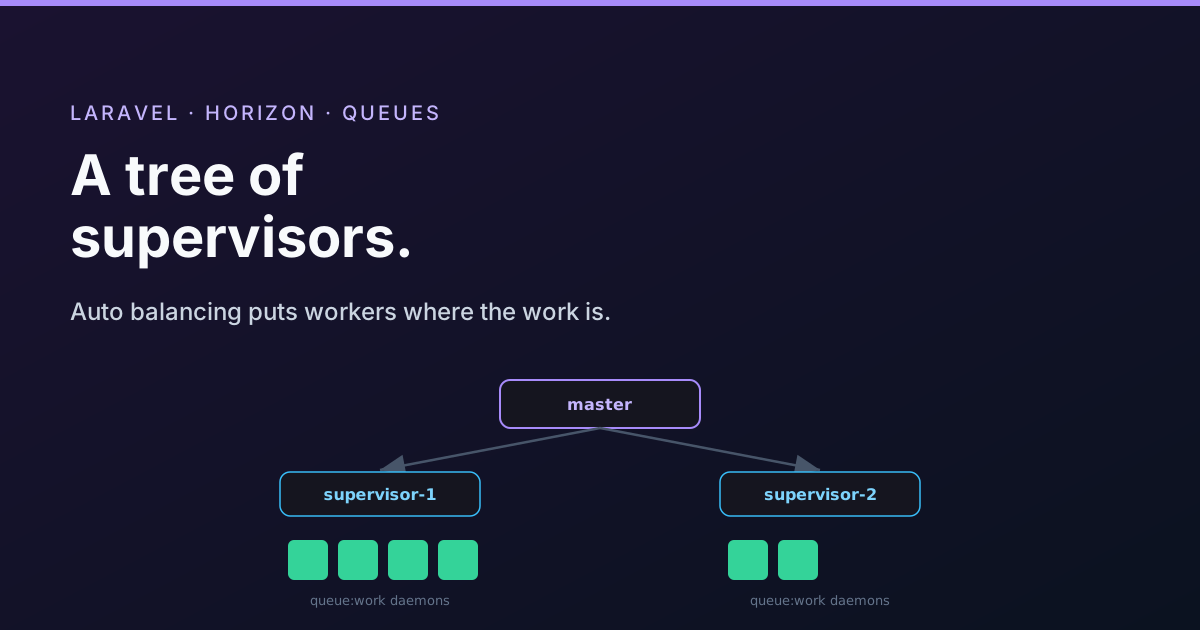
Laravel Horizon is a queue manager for Redis queues. It gives you a single config file to describe how your jobs should be processed, a dashboard to watch it all happen, and automatic scaling of workers as load changes. Underneath, it is orchestrating a tree of processes, and once you see that tree the configuration makes sense.
It starts with one command
You run Horizon with a single command, usually under a process manager so it stays alive.
php artisan horizon
This reads config/horizon.php and starts workers according to your environment's supervisors.
'environments' => [
    'production' => [
        'supervisor-1' => [
            'connection'   => 'redis',
            'queue'        => ['notifications', 'emails'],
            'balance'      => 'auto',   // 'simple', 'auto', or false
            'minProcesses' => 1,
            'maxProcesses' => 10,
            'memory'       => 128,
            'timeout'      => 60,
            'tries'        => 3,
        ],
    ],
],
Supervisors and process pools
A supervisor is a process whose job is to watch a set of workers and keep them running as configured. For each supervisor you set which queues it serves, how many worker processes it may run (a min and a max), the memory limit, timeout, tries, and the balancing strategy. You can define as many supervisors as you like per environment, each tuned for different work.
The three balancing strategies
The balance key decides how a supervisor spreads its workers across its queues, and it is the setting people most want to understand.
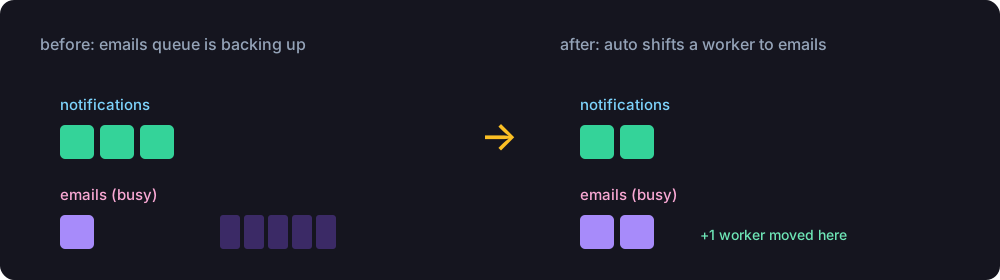
false(no balancing). One shared pool of workers pulls from all the supervised queues at once. Simple, but a busy queue can hog the workers.simple. Horizon creates one pool per queue and splits the worker processes evenly between them. With two queues and four processes, each queue gets a fixed pool of two. Predictable, but it does not react to load.auto. Horizon creates a pool per queue and then continuously watches how busy each queue is, shifting workers from quiet queues to busy ones, and back again as things settle. This is the strategy you usually want, because it puts capacity where the work actually is.
With auto, every pool always keeps at least minProcesses workers (so a queue is never completely unstaffed), and the total never exceeds maxProcesses. You can tune how aggressively it scales with balanceMaxShift (how many workers it can add or remove per cycle) and balanceCooldown (how long it waits between adjustments), and choose whether it scales by queue time or queue size with the auto scaling strategy.
The master supervisor
Above the supervisors sits the master supervisor. When you run horizon, the master reads your config and, for each supervisor it needs, dispatches an internal command to a special queue it watches. On each loop the master starts any pending supervisor as a real background process (effectively a horizon:supervisor command), keeps a handle to it, and makes sure it stays alive, restarting or re-provisioning it if it dies or if the config changed.
The master also registers signal handlers so it knows how to behave when told to stop or reload.
SIGTERMterminates cleanly.SIGUSR1restarts.SIGUSR2pauses.SIGCONTcontinues a paused state.
This is why Horizon can pause and resume the whole fleet gracefully, the signals propagate down the tree.
Down to the workers
Each supervisor, on its own loop, manages its process pools, monitors that each worker is alive, and, if you chose auto, does the balancing maths to move workers between pools. And at the very bottom, each worker process is nothing more exotic than a php artisan queue:work daemon, exactly the worker described in the workers post. Horizon's whole job is to start the right number of those, in the right places, and keep them healthy.
master supervisor
└── supervisor-1
    ├── pool: notifications  ──> queue:work, queue:work
    └── pool: emails         ──> queue:work, queue:work, queue:work
Metrics, and deploying Horizon
Because every worker reports through Horizon, the dashboard at /horizon shows throughput, runtime, job and queue counts, recent and failed jobs, and lets you retry failures by hand. Horizon also snapshots metrics over time so you can see trends; a scheduled horizon:snapshot keeps that data flowing.
Two operational notes. The nice setting controls the process priority of your workers, useful for keeping background jobs from starving your web server of CPU. And on deploy you must tell Horizon to reload, the same restart rule as plain workers.
php artisan horizon:terminate
Your process manager then brings Horizon straight back up on the new code, and the master rebuilds the whole supervisor tree from the freshly read config.
Wrapping up
Horizon is a tidy tree: a master supervisor starts and watches supervisors, each supervisor runs process pools, and each pool runs ordinary queue:work daemons. The balance strategy decides how workers spread across queues, with auto shifting them towards whichever queue is busiest. Add the dashboard and metrics, and you get full visibility and automatic scaling for the price of one config file. Just remember php artisan horizon:terminate on every deploy.
More in the series: the queue configuration keys explained and balancing job processing across tenants. Questions welcome below.


All comments ()
No comments yet
Be the first to leave a comment on this post.