

 Laravel

A job blows up in failed_jobs with a message like this:
Illuminate\Database\Eloquent\ModelNotFoundException:
No query results for model [App\Models\Listing] 41
Listing 41 definitely existed when you dispatched the job. It does not exist now. Nothing is broken in your code: this is the normal consequence of how Laravel puts models into a queue payload.
The job never stored your model
When a job uses SerializesModels, Laravel does not write the model's attributes into the payload. It writes the class name and the primary key, and reloads the record from the database when the worker picks the job up. Our post on how Laravel prepares a job for the queue walks through what that payload actually contains.
That behaviour is deliberate and usually what you want. Payloads stay small, and the job works with current data rather than a snapshot that went stale in the queue. The trade-off is that the reload can fail.
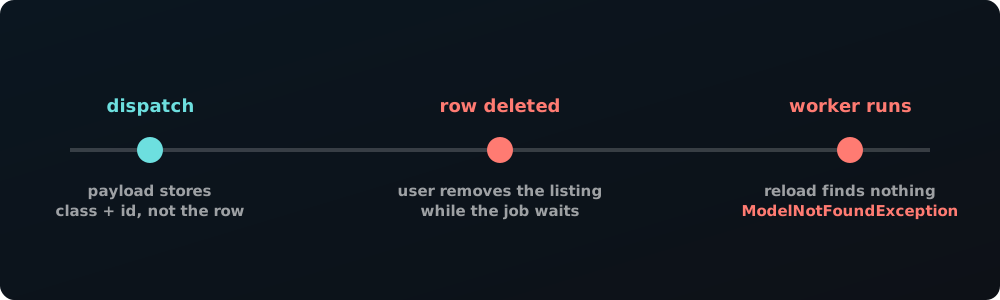
Anything that removes the row in that gap produces the exception: a user deleting their own listing, a cleanup command, a cascading delete from a parent record, or an admin moderating something out of existence. On a busy queue the gap can be minutes, and minutes is plenty.
The direct fix
If a missing record means the job simply has nothing to do, tell Laravel to drop it instead of failing:
class ModerateListing implements ShouldQueue
{
    use Queueable, SerializesModels;

    public bool $deleteWhenMissingModels = true;

    public function __construct(public Listing $listing) {}

    public function handle(): void
    {
        // ...
    }
}
With that property set, a job whose models cannot be restored is deleted quietly. It never reaches failed_jobs, never burns attempts, and never pages anyone.
Do not set it everywhere out of habit
The property makes failures silent, which is right for some jobs and wrong for others. Moderating a listing that no longer exists is genuinely a no-op. But a job that reconciles a payment, writes an audit record, or notifies somebody about a record that has vanished may be telling you about a real bug in your delete logic, and swallowing it hides that.
The question to ask is whether a missing record is an expected outcome or a surprise. Expected means delete the job. A surprise deserves to fail loudly.
Soft deletes hit this too
SerializesModels restores the model with an ordinary query, so a soft-deleted record looks missing even though the row is still there. If a job should still run for trashed records, override the restoration query on the model:
public function newQueryForRestoration($ids)
{
    return $this->newQueryWithoutScopes()->whereKey($ids);
}
That drops the soft-delete scope for restoration only, and leaves the rest of your queries alone.
When the row was never committed
There is a second cause worth knowing, because it produces the same exception for a completely different reason: dispatching a job inside a database transaction. The worker can pick the job up before the transaction commits, so it queries for a row that is not visible yet. That one is not about deletion at all, and the fix is afterCommit, which we cover in database transactions in Laravel.
If your exception happens immediately and reproducibly rather than occasionally, this is usually the reason.
Or stop depending on the record
Some jobs do not need the live model. If everything the job needs is known at dispatch time, pass those values instead of the model, and the reload cannot fail because there is no reload:
public function __construct(
    public int $listingId,
    public string $title,
) {}
This is the self-contained job approach, and it is worth reaching for when the job must behave the same regardless of what changed while it was queued.
Wrapping up
ModelNotFoundException in a worker is almost always the gap between dispatch and execution doing its job. Set $deleteWhenMissingModels on the jobs where a vanished record genuinely means there is nothing to do, leave it off where the absence is suspicious, and check for a transaction if the failure is instant rather than occasional.


All comments ()
No comments yet
Be the first to leave a comment on this post.