

 Laravel

Updated June 2026. Written for Laravel 13 on PHP 8.3. The same ideas work on Laravel 9, 10, 11 and 12. The only thing that moved along the way is where you register middleware, which went into
bootstrap/app.phpfrom Laravel 11 onward.
Giving every tenant their own database is one of those things that sounds hard until you see how Laravel actually wires up a connection. Once that part clicks, switching the database for the current tenant becomes three lines of code.
This is the model behind a lot of Laravel SaaS apps. Each customer signs up, gets their data kept well away from everyone else, and you still run a single codebase. Let us go through the decision first, then the mechanics, then a setup you can actually ship.
One shared database, or a database per tenant
The first decision is whether all your tenants share one database, or each gets their own.
If you share a single database, you add a tenant_id column to every table and you make sure every query is filtered by it. Laravel global scopes are the right tool here. A global scope adds the where tenant_id = ? clause to your Eloquent queries automatically, so you do not forget it somewhere and leak one customer's rows to another.
That works, and for many apps it is the simpler path. But it is not the only path, and for some apps it is the wrong one.
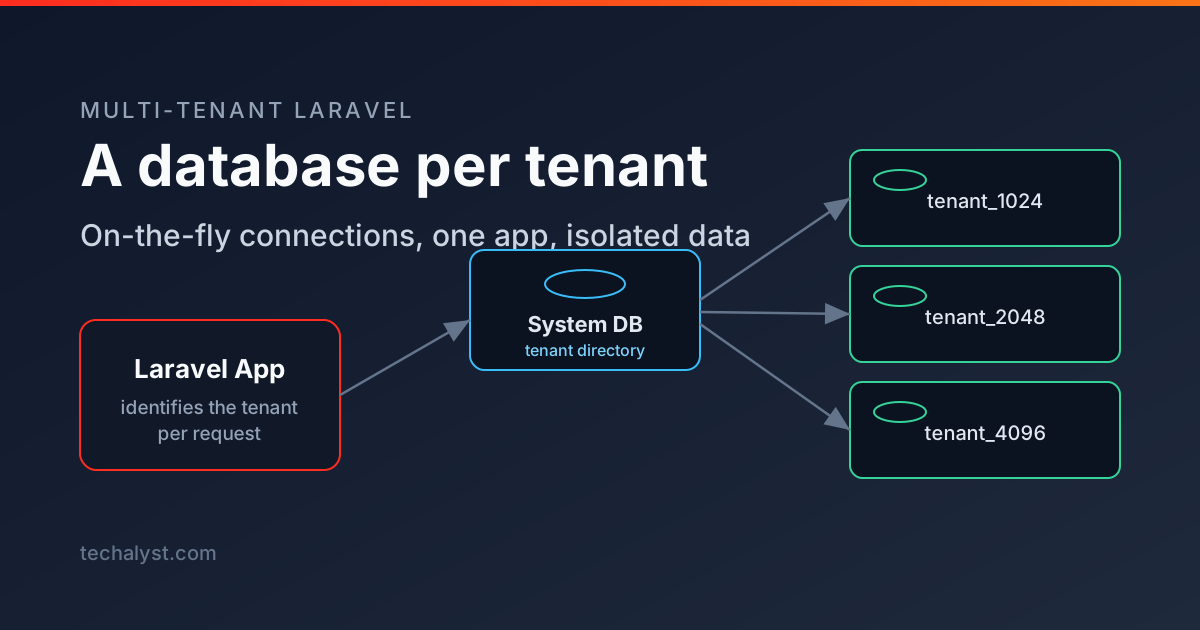
I learned this the slow way. I built an ERP product that started on the shared database approach. It was fine early on. As customers grew and their data grew, the single shared database started to feel like a liability rather than a convenience. So during a major version upgrade I moved every customer into their own database, and kept one small shared database as a master that acts like a router. A request comes in, I match the domain against that master database to find the customer, and then I point the app at the correct customer database for the rest of the request.
Here is how that decision felt afterwards, the good and the bad.
What I liked about a database per tenant
- Most of the code stopped caring about tenancy. The right database is chosen once, early in the request, and the rest of the app just runs normal queries.
- Data isolation is easier to reason about. There is only one place that picks the database, so it is the only place you have to get right. If one tenant's database has a problem, the others are untouched.
- Third party packages just work. A lot of packages never considered the shared
tenant_ididea, so on a shared schema you end up patching them. With a separate database you do not have to. - Exporting a customer is simple. If a client leaves, or wants their data on their own server, you hand over one database.
- Big customers can be moved to their own hardware without a rewrite. Same export, different host.
- You can group tenants. Half your customers in one region, half in another, or beta features for a small set of tenants while everyone else stays on the stable path.
What it costs you
- Migrations run per database. Every schema change has to loop over all tenant databases, so it takes longer and needs a command of its own.
- Background jobs need to know the tenant. A queued job runs outside the original request, so you have to carry the tenant id into the job and set the connection again before it runs.
- Other services need the same care. If you send mail through a provider, or push to some external system, you want the tenant baked into the identifier so replies and stats route back to the right customer.
None of the cons are blockers. They are just things you have to be deliberate about. With that out of the way, let us look at how Laravel connections actually work, because that is the part that makes the rest easy.
How Laravel configures a database connection
When you run a query, you are not really talking to the database directly. Illuminate\Database\DatabaseManager sits in the middle and hands you a connection to run the query on. Every connection has a name, and you pick a default that gets used when you do not name one.
// Uses the default connection.
DB::table('users')->get();

// Uses the "tenant" connection.
DB::connection('tenant')->table('users')->get();
The important detail is this. A connection is built once and then kept for the rest of the request. The first time you ask for tenant, Laravel reads the config, opens a PDO connection and caches it. Every query after that reuses the same connection object. PDO, by the way, is the standard PHP interface Laravel uses underneath to talk to the database. If you ever split reads from writes, a single connection can even hold separate read and write PDO objects, but for a database per tenant you usually just want one connection pointed at the right database.
That caching is what makes the next part work, and also what trips people up.
Set up a system connection and a tenant connection
Most database per tenant apps keep a central database with the list of tenants, and then a separate connection for whichever tenant is active. So you end up with two connections in config/database.php. One that never changes, and one that you fill in at runtime.
'connections' => [

    // The central database. Always the same, holds the tenant directory.
    'system' => [
        'driver'   => 'mysql',
        'host'     => env('DB_HOST', '127.0.0.1'),
        'port'     => env('DB_PORT', '3306'),
        'database' => env('DB_DATABASE', 'system'),
        'username' => env('DB_USERNAME'),
        'password' => env('DB_PASSWORD'),
        'charset'  => 'utf8mb4',
        'collation'=> 'utf8mb4_unicode_ci',
    ],

    // The tenant database. Notice "database" is left blank on purpose.
    'tenant' => [
        'driver'   => 'mysql',
        'host'     => env('DB_HOST', '127.0.0.1'),
        'port'     => env('DB_PORT', '3306'),
        'database' => null,
        'username' => env('DB_USERNAME'),
        'password' => env('DB_PASSWORD'),
        'charset'  => 'utf8mb4',
        'collation'=> 'utf8mb4_unicode_ci',
    ],

],
Querying the system connection is easy, the config is right there in the file.
DB::connection('system')->table('tenants')->get();
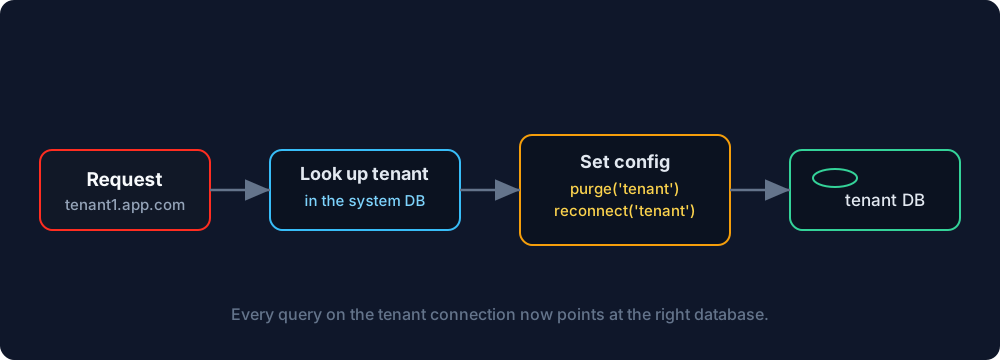
The tenant connection is the interesting one. We do not know the database name ahead of time, because it depends on who is making the request. So we set it on the fly.
Switch the tenant database on the fly
You can change any connection setting at runtime through the config helper.
config(['database.connections.tenant.database' => 'tenant_1024']);
You can do the same for username, password, host, read and write connections, anything that lives under that connection key.
But remember the caching. If the tenant connection was already resolved earlier in the request, your new config does nothing, because Laravel is still holding the old connection. To make the change take effect you throw the old one away and reconnect.
config(['database.connections.tenant.database' => 'tenant_1024']);

DB::purge('tenant');
DB::reconnect('tenant');
purge drops the cached connection, reconnect builds a fresh one from the config you just set. After these three lines, every query on the tenant connection goes to tenant_1024. The safe habit is to set the config before anything has touched the tenant connection, and to always purge and reconnect when you switch.
Where this code should live
A Laravel app has a few different ways in. A normal HTTP request, a console command, and a queued job. Each one needs the tenant set before your code runs. Let us handle the three.
HTTP requests, with middleware
For web traffic, middleware is the natural home. It runs early, before your controllers, which is exactly when you want the connection pointed at the right place.
// app/Http/Middleware/IdentifyTenant.php
namespace App\Http\Middleware;

use Closure;
use Illuminate\Http\Request;
use Illuminate\Support\Facades\DB;

class IdentifyTenant
{
    public function handle(Request $request, Closure $next)
    {
        $tenant = DB::connection('system')
            ->table('tenants')
            ->where('domain', $request->getHost())
            ->first();

        abort_if(! $tenant, 404, 'Unknown tenant');

        config(['database.connections.tenant.database' => $tenant->database]);

        DB::purge('tenant');
        DB::reconnect('tenant');

        return $next($request);
    }
}
From Laravel 11 onward, including Laravel 13, you register it in bootstrap/app.php instead of the old HTTP kernel.
// bootstrap/app.php
->withMiddleware(function (Middleware $middleware) {
    $middleware->web(append: [
        \App\Http\Middleware\IdentifyTenant::class,
    ]);
})
If you want your models to use the tenant connection without naming it every time, set it as the default inside the middleware after you reconnect.
config(['database.default' => 'tenant']);
Or keep system as the default and tell the tenant models which connection they belong to.
class Invoice extends Model
{
    protected $connection = 'tenant';
}
You will also see this done inside a service provider, by reading the request host in the boot method and switching the connection there. It keeps all the tenancy wiring in one TenancyServiceProvider, right next to the queue setup below.
// app/Providers/TenancyServiceProvider.php
use Illuminate\Support\Facades\DB;

public function boot(): void
{
    // Console commands and queued jobs have no request host, so skip them
    // here and let them set the tenant their own way.
    if (! $this->app->runningInConsole()) {
        $tenant = DB::connection('system')
            ->table('tenants')
            ->where('domain', request()->getHost())
            ->first();

        if ($tenant) {
            config(['database.connections.tenant.database' => $tenant->database]);

            DB::purge('tenant');
            DB::reconnect('tenant');
        }
    }

    // ...queue payload and JobProcessing wiring from the next section go here too.
}
Both do the same job. Middleware is the cleaner home because it runs at a well defined point in the request and is easy to test in isolation, while the provider keeps everything tenancy related in one file. Pick whichever fits how you like to organise your code.
Queued jobs
A job runs later, in a separate process, so the request that knew the tenant is long gone. The fix is to carry the tenant id inside the job payload, then set the connection again when the job is picked up.
In a service provider, add the tenant id to every payload while a tenant is active, and listen for the moment a job starts processing.
// app/Providers/TenancyServiceProvider.php
use Illuminate\Support\Facades\Queue;
use Illuminate\Queue\Events\JobProcessing;

public function boot(): void
{
    Queue::createPayloadUsing(function () {
        return CurrentTenant::get()
            ? ['tenant_id' => CurrentTenant::get()->id]
            : [];
    });

    $this->app['events']->listen(JobProcessing::class, function (JobProcessing $event) {
        $payload = $event->job->payload();

        if (isset($payload['tenant_id'])) {
            CurrentTenant::setById($payload['tenant_id']); // sets config + purge + reconnect
        }
    });
}
CurrentTenant here is just a small helper of your own that holds who the active tenant is and runs the same set config, purge and reconnect we did in the middleware. Keeping that logic in one place means the web path and the queue path behave the same.
Console commands
A command has no request and no domain to read, so you tell it which tenant to run against. Pass the tenant as an argument or option, resolve it from the system database, and set the connection before the command does its work.
$tenant = DB::connection('system')
    ->table('tenants')
    ->where('id', $this->argument('tenant'))
    ->firstOrFail();

config(['database.connections.tenant.database' => $tenant->database]);
DB::purge('tenant');
DB::reconnect('tenant');
Migrating every tenant
Because each tenant has its own database, your migrations have to run against each one. Keep tenant migrations in their own folder, then write a command that loops over the tenants and runs them one by one.
// php artisan tenants:migrate
public function handle(): int
{
    $tenants = DB::connection('system')->table('tenants')->get();

    foreach ($tenants as $tenant) {
        config(['database.connections.tenant.database' => $tenant->database]);
        DB::purge('tenant');
        DB::reconnect('tenant');

        $this->info("Migrating {$tenant->database}");

        $this->call('migrate', [
            '--database' => 'tenant',
            '--path'     => 'database/migrations/tenant',
            '--force'    => true,
        ]);
    }

    return self::SUCCESS;
}
Run it on deploy and every tenant database moves forward together. The same looping idea works for seeding and for any maintenance command you need to run across all tenants.
Wrapping up
The whole thing rests on one idea. Laravel builds a connection from config and then caches it, so if you change the config you have to purge and reconnect for the change to matter. Set the tenant database in middleware for web requests, carry the tenant id into queued jobs, pass it explicitly to console commands, and loop over tenants when you migrate. That is a database per tenant SaaS in Laravel, without any package doing the magic for you.
If you have questions about Laravel database per tenant, on the fly connections, or running migrations across many databases, leave a comment below and I will help where I can.


All comments ()
No comments yet
Be the first to leave a comment on this post.